Elevate Your Scheduling Platform with Customizable Acuity Templates
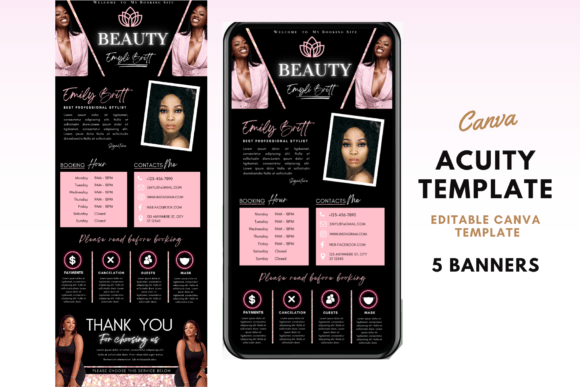
For independent professionals and small businesses using Acuity Scheduling, the platform’s core functionality is robust. It manages appointments, payments, and client communication effectively. However, the visual presentation of your scheduling pages—the pages clients actually see and interact with—often lacks a distinct brand identity. This is where the concept of an Acuity Scheduling Canva Template becomes a significant practical asset. It is a collection of pre-designed, fully editable graphic templates specifically formatted for Acuity, allowing you to create cohesive and professional banner images and promotional graphics that align seamlessly with your brand.
The Core Value of Pre-Designed Templates for Acuity
The primary purpose of these Acuity Scheduling Canva Templates is to bridge the gap between operational efficiency and brand presentation. Acuity provides a white-label service, meaning you can embed its scheduler into your own website. The look of the scheduler itself is customizable within Acuity's settings, but the surrounding promotional visuals on your site—the banners, calls-to-action, or featured service graphics—are typically created separately. Having a dedicated set of templates ensures these elements are not generic or hastily made, but rather integral parts of your site's design.
The key strength lies in their focused specification. These templates are designed at 2000x1000px, a dimension suitable for prominent website headers or large featured areas. This intentional sizing removes the guesswork and ensures your final graphic will be technically suitable for its intended placement. Furthermore, they are built for editing within Canva, a widely accessible design tool. The claim that the free version of Canva is sufficient is accurate; you do not need a Pro subscription to change colors, fonts, images, or text within these templates. This dramatically lowers the barrier to entry for users without advanced design skills or software budgets.
Practical Usability and Customization Flexibility
Evaluating the usability of these Acuity Scheduling Canva Templates from a professional workflow perspective highlights their practical value. A common hurdle for entrepreneurs is time. Creating a visually appealing graphic from a blank canvas, even in Canva, requires design time and decision-making. These templates provide a structured starting point. You are not starting from zero; you are starting from a professionally composed layout.
The flexibility promised is genuine. Within Canva, every element on these templates is movable, resizable, and replaceable. You can:
- Swap out placeholder images with your own photography or brand assets.
- Change the color palette in moments to match your existing website scheme.
- Alter all text to reflect your specific services, tone, and offers.
- Add or remove icons and graphical elements as needed.
- Apply Canva’s built-in animation effects to elements for dynamic presentation.
This level of control means the final output is not a cookie-cutter graphic. It becomes a unique asset for your business. For instance, a therapist could adapt a template with calming colors and serene imagery, while a fitness coach might opt for vibrant, energetic colors and action shots. The template provides the framework, but the brand provides the character.
Assessing Quality and Long-Term Cohesion
The quality of such a product hinges on the original design of the templates. The term “aesthetically pleasing” suggests a modern, clean, and purposeful layout. In real-world use, this translates to graphics that don’t appear cluttered or amateurish, which helps build client trust. A professional-looking scheduling interface subconsciously reassures clients about the legitimacy and organization of your service.
Consistency is another major benefit. Using the same set of Acuity Scheduling Canva Templates for all your scheduling-related graphics—whether for different service pages or seasonal promotions—creates a visual rhythm across your website. This cohesion strengthens brand recognition. Over the long term, as your services evolve, you can return to these same templates and update them rather than commissioning new designs, offering sustained value.
Who Benefits Most from These Templates?
The audience for these tools is broad, aligning perfectly with Acuity’s own user base. Freelancers, consultants, coaches, tutors, small service-based business owners, and creatives who use Acuity Scheduling are the primary beneficiaries. Specifically, they are ideal for:
- Professionals without a dedicated design resource: Individuals who manage their own website and branding.
- Those seeking a quick visual upgrade: Users who recognize their current scheduling page visuals are lacking but lack time for a full redesign.
- Brands with established color and font guidelines: Businesses that need promotional graphics to strictly adhere to their existing brand book.
The situation where these templates are most impactful is when a business is scaling or refining its online presence. As you attract more clients through your website, every touchpoint, including the scheduling portal, should reflect your professionalism.
Realistic Considerations and Limitations
A balanced evaluation requires acknowledging the scope of these Acuity Scheduling Canva Templates. They are graphic design templates, not functional plugins for Acuity. They do not change the backend operation of your scheduler. Their effectiveness is entirely in the realm of visual communication and user experience.
Furthermore, while customizable, they require a basic familiarity with Canva’s interface. The editing process is straightforward, but a user completely new to the tool will need to learn its fundamentals. Also, the output quality will depend on the assets you insert; using low-resolution images or clashing color choices can undermine the template’s foundation. The template provides a superior starting point, but the final quality remains in the user’s hands.
Making an Informed Decision for Your Needs
When considering whether these Acuity Scheduling Canva Templates fit your project, ask yourself a few practical questions. Does your current Acuity scheduler or its promotional page feel visually disconnected from your main website? Do you spend unnecessary time trying to create matching graphics for your services? Are you looking for a cost-effective way to elevate your site’s professionalism without hiring a designer?
If your answers lean toward yes, then these templates offer a clear, actionable solution. They are a utility, not a luxury. For the serious hobbyist turning professional, the educator launching private tutoring, or the marketer optimizing a client’s booking flow, these templates represent a smart investment in brand consistency. They transform a purely functional tool—your scheduler—into an integrated, branded experience.
Ultimately, the value of the Acuity Scheduling Canva Template collection is measured in saved time, enhanced brand perception, and client confidence. By providing a structured, editable, and visually coherent foundation, they enable business owners to focus on their service while ensuring the presentation of that service meets the same high standard.