Canva Templates for E-books and Workbooks: A Practical Option for Content Creators
For anyone looking to create a professional digital workbook, guide, or e-book, the process of design can be a significant hurdle. Traditional methods involve specialized software, font licensing, and a steep learning curve. A popular alternative that has emerged is the use of pre-designed templates within online design platforms, specifically the E-book Workbook Canva Template. This approach represents a distinct category of digital product, blending accessibility with customizable design.
What Is an E-book Workbook Canva Template?
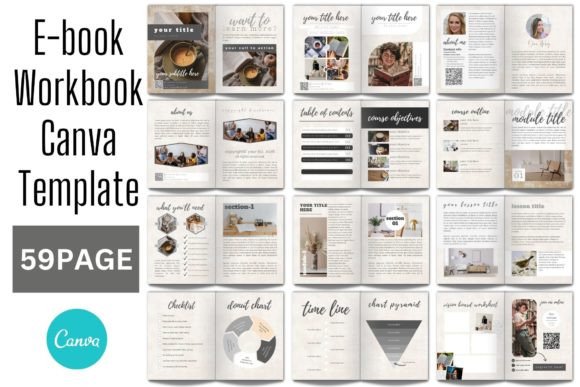
Essentially, an E-book Workbook Canva Template is a fully designed document framework purchased from a template creator. It is delivered not as a static PDF or editable file for software like Adobe InDesign, but as a link or instruction file that allows you to copy the template directly into your own Canva account. After purchasing, you typically receive a PDF file containing a link and instructions to access the template on Canva.
The key distinction is that no software installation is required, and no fonts need to be installed locally. All editing happens within your web browser on Canva’s platform. You are not buying a final, locked product; you are buying a customizable starting point that resides in a cloud-based tool. This model shifts the focus from technical design skill to content creation and straightforward customization.
Core Capabilities and Customization
Once the template is in your Canva account, the scope of editing is broad, designed to give you control without requiring deep design expertise. According to typical offerings, you can:
- Edit all text, including headings, body copy, and labels.
- Change fonts, their color, and size from Canva’s own extensive library.
- Upload your own images, photographs, and logo to personalize the content.
- Move, add, remove, rotate, and scale any graphical element within the template.
- Change the color of shapes, backgrounds, and other design elements.
The process is iterative: you edit directly in your browser, share drafts with collaborators if needed, and the template is saved in your Canva account for reuse or future editions. This is particularly useful for creators who produce multiple workbooks or update their materials periodically.
The Required Skill Level: BASIC Knowledge
A crucial consideration is the skill requirement. Providers often state that BASIC knowledge of Canva is needed. This generally means understanding how to drag and drop elements, move objects, resize images, and type text into text boxes. If you can perform these core functions, you should be able to successfully adapt an E-book Workbook Canva Template. It does not require knowledge of layout principles, color theory, or advanced graphic design techniques. The template provides the visual structure, and you fill it with your expertise.
Comparing This Approach to Alternative Paths
When evaluating how to create a digital workbook or e-book, it’s helpful to compare this template-based approach with other common methods to understand tradeoffs.
Traditional Desktop Design Software
Using professional software like Adobe InDesign or Affinity Publisher offers maximum control, precision, and capability for complex layouts. The tradeoff is significant: it requires purchasing expensive software, investing considerable time in learning, managing font files, and handling print-ready PDF exports. An E-book Workbook Canva Template eliminates these technical barriers but, conversely, offers less granular control. You work within Canva’s framework and its toolset. For instance, typographic fine-tuning and advanced grid systems are limited compared to dedicated desktop software.
Building from Scratch in Canva
Another alternative is to design your workbook entirely from scratch within Canva’s free or Pro plans. This offers total creative freedom from a blank page but demands a higher level of design competence and time investment. An E-book Workbook Canva Template provides a proven, professional layout instantly. This is a major benefit for those who have the content ready but lack the time or confidence to build a visually coherent structure from zero. It accelerates the process dramatically.
Hiring a Professional Designer
Commissioning a custom design delivers a unique, expertly crafted product tailored to your brand. The obvious tradeoffs are cost and timeline. Purchasing a template is a one-time, lower-cost investment that puts you in control of the timeline. You make edits immediately without waiting for a designer’s schedule. However, the final product may lack the unique flair of a custom design and might share structural similarities with other templates from the same creator.
Identifying the Best-Fit Situations
The decision to use an E-book Workbook Canva Template depends heavily on your specific goals, resources, and skills.
This approach may be the right choice when:
- Your primary asset is your written content or expertise, not your design skill.
- You need a professional-looking result quickly, perhaps for a launch, course, or client project.
- Your budget does not allow for professional software or hiring a designer.
- You value simplicity and a straightforward, browser-based editing process.
- You foresee needing to update or slightly alter the workbook in the future with minimal hassle.
- You are comfortable with the core, drag-and-drop functionality of Canva.
You might need another option when:
- Your project requires highly specific, brand-unique layouts that cannot be achieved within a template’s constraints.
- You are preparing a file for professional, high-resolution printing with specific bleed, margin, and color space requirements (Canva is primarily optimized for digital output).
- You already possess advanced skills in professional design software and prefer its capabilities.
- You require interactive ebook features beyond static pages (e.g., embedded complex animations, interactive quizzes) that Canva’s standard PDF export does not support.
Practical Considerations and Limitations
To make an informed decision, it’s practical to consider some inherent aspects of working with such templates.
First, while you can change fonts, you are limited to fonts available within Canva’s system (its own library and possibly uploaded brand fonts if you have a Pro plan). This is simpler than managing desktop fonts but may not include every niche font you desire.
Second, the template’s original layout is a guide. While you can move elements, radical restructuring of the page architecture might break the visual balance. The template works best when you follow its underlying grid and flow, adapting content into its framework.
Third, the output is typically a PDF file exported from Canva. This is perfectly suitable for digital distribution, email delivery, or online course platforms. However, for workflows requiring other file formats (like EPUB for e-books), additional conversion steps would be necessary outside of Canva.
Realistic Examples of Use
Imagine a life coach creating a 30-day mindfulness journal. They have the prompts and exercises written but lack design time. An E-book Workbook Canva Template with serene graphics and clean journal layouts allows them to insert their text, add a few personal photos, and publish a polished workbook to their clients within a day.
Consider a small business consultant developing a strategic planning workbook for workshops. They need a professional document that reflects their brand. They purchase a business-themed template, upload their company logo, adjust colors to match their brand palette, and fill the sections with their proprietary frameworks. They can then share the editable Canva link with an assistant to make final tweaks before exporting.
Making Your Decision: Key Factors to Evaluate
If you are comparing options, your evaluation should hinge on a few concrete factors.
- Speed vs. Customization: How quickly do you need the finished product versus how unique must the design be? Templates favor speed.
- Skill vs. Investment: Do you want to invest your time in learning design software or in creating and marketing your content? The template path invests your time in content.
- Digital vs. Print Focus: Is your primary distribution digital? If yes, Canva’s output is ideal. For complex print projects, assess carefully.
- Future-Editing Need: Will this be a living document you update? The reusability of a saved Canva template is a significant advantage.
The E-book Workbook Canva Template model is a compelling, practical tool for a wide range of content creators. It democratizes design by providing a high-quality starting point and placing the editing power in the hands of the expert, not the designer. By understanding its distinct place among alternatives—its strengths in accessibility and speed, and its tradeoffs in ultimate customization—you can determine if it aligns with your project’s needs and your personal workflow. For many, it represents a balanced solution that removes a major technical barrier, allowing them to focus on sharing their knowledge with the world.